






ExpressionSample
Updated: 09/29/2026
Summary
This sample demonstrates how to animate a model’s facial expressions in Unreal Engine using a facial expression file (.exp3.json) exported from Cubism Editor via the Cubism SDK for Unreal Engine.
See “Expression (UE)” for details on the expression function.
The following assets are available in Content/Samples/Expression.
- ExpressionSample
Level asset containing the sample - ExpressionSampleUI
Widget blueprint for controlling the UI displayed in the sample - ExpressionSampleUICompoBoxItem
UI asset used within ExpressionSampleUI
Purpose
You can select a facial expression from the list of .exp3.json files configured within each model’s .model3.json file to check how the facial expressions work for each model.
If you want to review the details of the sample implementation, check the contents of the ExpressionSample level blueprint and the ExpressionSampleUI widget blueprint.
How to use
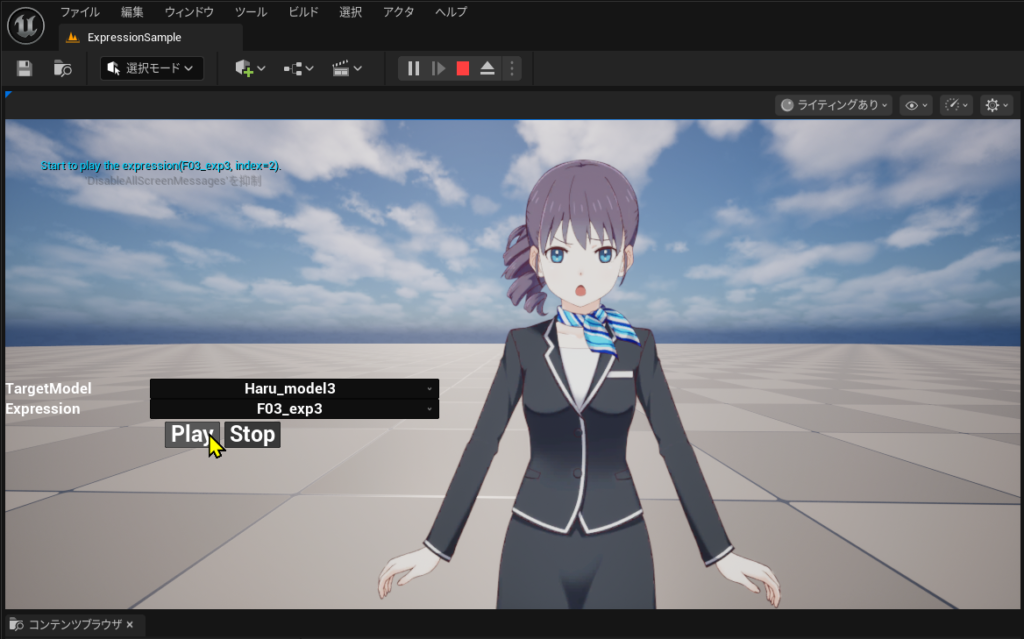
Open the ExpressionSample level and start PIE. If the model is displayed too far away, move closer to the model.
Next, display the mouse cursor, select the model whose expression you want to change from the “TargetModel” drop-down list, and then select the expression you want to play back from the “Expression” drop-down list.
After making your selection, press the “Play” button to change the facial expression. Press “Stop” to go back to the original facial expression.