


Masks in URP
Updated: 10/20/2026
This page contains statements regarding the beta version.
In Cubism 5 SDK for Unity R5 beta3 and later, the rendering pipeline has moved to the Universal Rendering Pipeline (hereinafter referred to as URP). As a result, the mask function mechanism has changed.
Changes from R4_1
In Cubism 5 SDK for Unity R6 and later, all models support pre-processing masks.
You can continue to use the high-definition masking method, which became available in Cubism 5 SDK for Unity R5.
The mask applied to offscreen drawing always uses the high-definition mask method. For more details, refer to the section titled “About masks in offscreen drawing.”
The pre-processing mask method—including the Subdivisions method used in Cubism 5 SDK for Unity R4_1 and earlier versions, as well as the R4_x series—has been deprecated. Instead, the pre-processing mask method used in the “for Native” and “for Web” Original Workflow SDKs has been adopted.
The Assets/Live2D/Cubism/Rendering/Masking and other files previously used in Cubism 5 SDK for Unity R4_1 and earlier, as well as the R4_x series, are no longer used and have been removed for performance reasons.
Instead, the following files will be added and used with the new mask method.
- Under Assets/Live2D/Cubism/Rendering/Masking
- CubismClippingManager.cs
- CubismMaskTextureController.cs
- Under Assets/Live2D/Cubism/Editor/Inspectors
- CubismMaskTextureControllerInspector.cs
When updating from R4_1, the files that are no longer used will remain in the projects unless deleted, but each component will no longer be used by the model. Note that since the CubismMaskController component is a MonoBehaviour, it must be explicitly removed from the model prefab to stop the process.
Please refer to “Migration from Built-in Render Pipeline to URP” for the location of the files that are no longer used and will be removed and how to migrate to URP.
How to use
When you import a model that uses a mask, a CubismMaskTextureController is automatically attached to the model prefab.
The default is the pre-processing mask method.
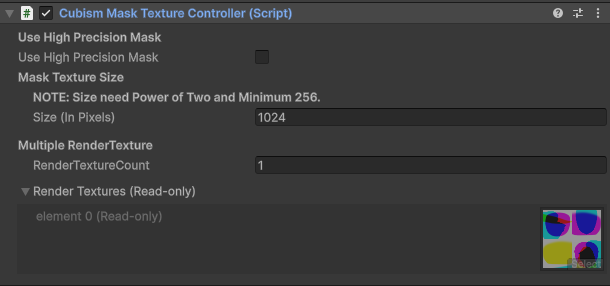
Use High Precision Mask
Switches to the high-definition mask method.
Size (In Pixels)
Set the size of the mask texture.
This value must be a power of 2. The default value is 1024, and the minimum value is 256.
RenderTextureCount
Set the number of render textures to use.
The minimum value is 1.
Render Textures (Read-only)
This is a preview of the render texture currently in use.
Pre-processing mask method
This is a method in which all mask shapes are drawn in a single mask buffer at the beginning of the model drawing process.
For more details on the specifications of this method, refer to “Mask pretreatment methods (Native).”
High-definition mask method
The high-definition mask method is a method that performs the drawing process of the mask used by a drawable object each time just before drawing that drawable object.
This method emphasizes drawing quality over performance and has the following advantages over the mask method used by R4_1 or earlier.
- The maximum number of masks used is unlimited.
- Since only the screen resolution texture is required for masking, memory usage is reduced.
- Masks are not divided, but drawn on a single texture in sequence, which improves the quality of mask drawing.
However, there are some disadvantages as follows:
- Even if the same ArtMesh is set as a mask, it will be drawn at separate times.
- This effect reduces performance, especially when using the same ArtMesh, compared to masking methods used by R4_1 and earlier.
- Since the size of the mask drawing is fixed to the size of the camera’s render target, the size of the render target reflecting the model can have a significant impact on performance.
About masks in offscreen drawing
The mask applied to the offscreen drawing is drawn and applied at the position and size where the ArtMesh set as a mask is drawn on the screen, unlike when clipping ArtMesh, due to the calculation in the shaders.
Due to the nature of this mechanism, the high-definition mask method is automatically used for offscreen drawing.
If the RenderTexture of the camera on which the Cubism model is drawn has the same resolution as the screen resolution and the render target displayed on the entire screen is the same, the drawing result will not be degraded because the required number of pixels will be reserved (dot-by-dot).
Streamlining the mask drawing process
In Cubism 5 SDK for Unity R6, a mask caching function has been added to improve the performance of mask drawing using the high-definition mask method.
The mask caching function skips the redrawing of the mask by reusing the drawing result of the first mask drawn when Drawables that use the same mask are drawn consecutively.
The result is improved mask redrawing performance.