








How to use the model parameters in UE
Updated: 09/29/2026
In the Cubism SDK for Unreal Engine, you can use the Cubism Model Parameter Controller with an editor extension to see exactly how Live2D models imported into Unreal Engine will move on the View.
Usage
- Import a Live2D model into a project that has the Cubism SDK for Unreal Engine installed, create a uasset from the .model3.json file, place it in the View, and generate an actor for the Live2D model.
- Right-click the Outliner or the actor of a spawned Live2D model and select “Cubism Model Parameter Controller” from the context menu.
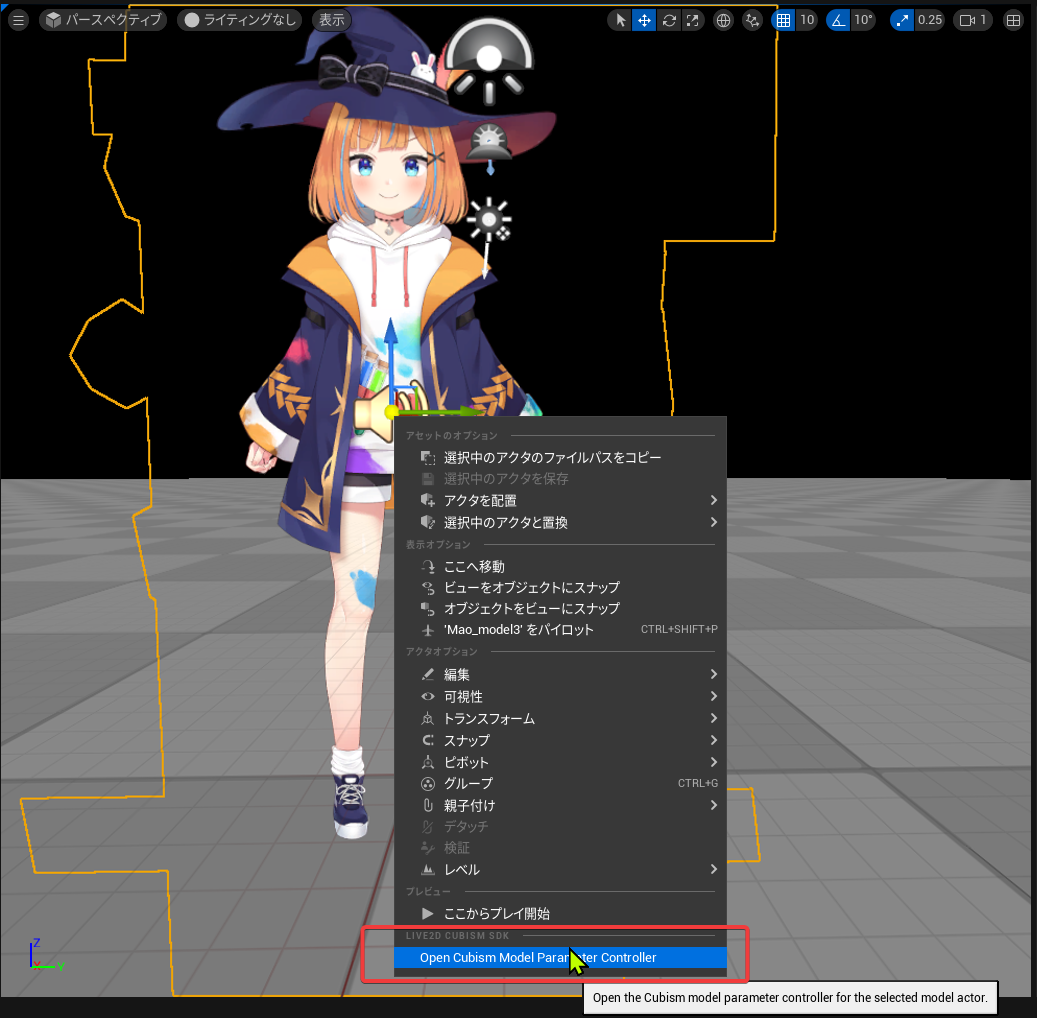
- The “Cubism Model Parameter Controller” Inspector will appear, allowing you to use the sliders in the Inspector to preview parameter operations.
Precautions
Only parameter changes made with the “Cubism Model Parameter Controller” while “Play in Editor” is off are applied.
Note that if “Play in Editor” is on, any changes you make to the “Cubism Model Parameter Controller” will not be applied.
Was this article helpful?
YesNo