








Dynamic Batch Processing
Updated: 10/20/2026
In Cubism 5 SDK for Unity R6 and later, you can enable a unique dynamic batch processing function to improve performance.
Summary
In Cubism 5 SDK for Unity R5, due to the nature of its drawing process, it was not possible to use Unity’s dynamic batch processing or the SRP Batcher.
In Cubism 5 SDK for Unity R6 and later, batch processing has been implemented to dynamically group the vertices of a Drawable’s Mesh as much as possible before drawing.
This allows you to reduce the number of draw calls for Drawables and improve performance.
How to Use
Add a CubismRenderPassFeature to any Universal Render Data asset, or check the Inspector for Assets/Live2D/Cubism/Rendering/URP/CubismURPRenderer.asset.
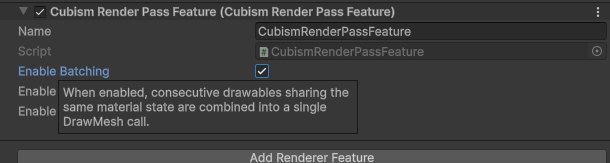
Then, enable “Enable Batching.”
Conditions under which dynamic batch processing is effective
There are certain conditions that must be met for dynamic batch processing to work.
Conditions specific to each object
- The object must be a Drawable.
- Offscreen drawing is not supported.
- Masks are not applied.
- The blend modes added in Cubism 5.3 are not used.
Items that must meet the same conditions as the Drawable that was drawn immediately before
- CubismRenderer.DrawMaterial (CubismRenderer.Material if null)
- CubismRenderer.MainTexture
- CubismRenderer.DisplayedMultiplyColor
- CubismRenderer.DisplayedScreenColor
- CubismRenderController.CurrentFrameBuffer
- Regardless of whether offscreen drawing is used, the actual drawing destination must be the same as that of the immediately preceding Drawable.
- CubismRenderController.Opacity
Other conditions
- The drawing interrupt function is not being used between the drawing of the current object and the one immediately preceding it.
- The number of Drawables targeted for batch processing must be at least the number set with BatchThreshold.
- When spanning multiple models, the models must share the same Grouped Sorting Index.